
Add a study

And where do I add my experimental design? Where can I describe how I grew my plants under different conditions?
With studies you can describe materials and resources. In this Violas-PhD-Project you can add the different growth conditions of your plants here.
Create a new study
Section titled “Create a new study”-
Click on the plus icon add next to science
studiesto add a new study. -
Enter a name for the
New Study.AthalianaColdStress
-
Click
New Study. -
ARCitect adds the study
AthalianaColdStressincluding the foldersprotocolsandresourcesas well as aREADME.mdand theisa.study.xlsxworkbook.- AthalianaColdStressSugar
Directorystudies
- AthalianaColdStress
Directoryprotocols
- …
Directoryresources
- …
- isa.study.xlsx
- README.md
- …
-
Click on the study’s name (
AthalianaColdStress) in the file tree to edit the study metadata in the right panel. -
Here you can add metadata about your study.
My description: “Cold acclimation analysis of Arabidopsis leaf tissue”
-
In the left sidebar open the
File explorer -
Click on the plus icon next to
studiesto add a new study. -
Enter an identifier for the
New Study.AthalianaColdStress
-
Click
Create Study. -
ARCitect-GX adds the study
AthalianaColdStressincluding the foldersprotocolsandresourcesas well as aREADME.mdand theisa.study.xlsxworkbook.- AthalianaColdStressSugar
Directorystudies
- AthalianaColdStress
Directoryprotocols
- …
Directoryresources
- …
- isa.study.xlsx
- README.md
- …
-
Click on the study’s name (
AthalianaColdStress) in the file tree edit the study metadata in the right panel.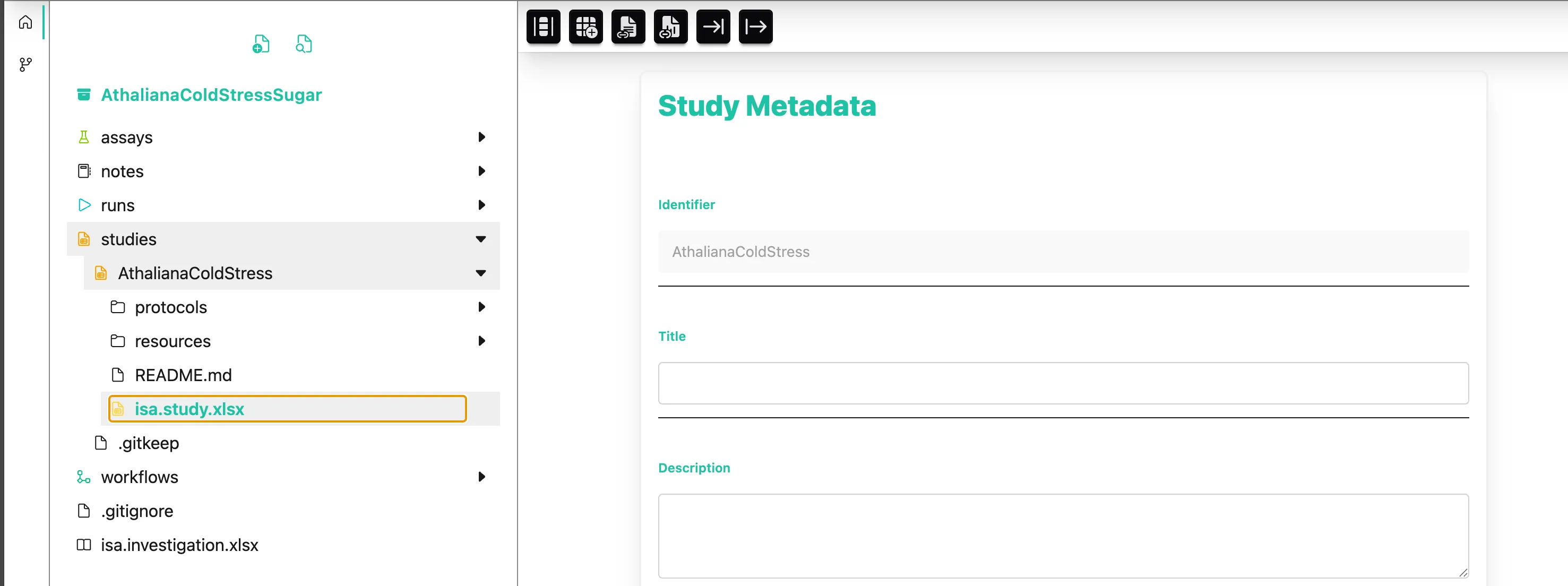
-
Here you can add metadata about your study.
My title: “Cold acclimation analysis of Arabidopsis leaf tissue”
Protocols
Section titled “Protocols”I saved my lab notes about the plant growth in the file growth_protocol.md. Can I store that somewhere?
You can use the protocol subdirectory to store free-text protocols that describe how the samples or materials were created.
-
Right-click on the
protocolsfolder and selectImport Filesfrom the context menu. -
Select the file
growth_protocol.mdfrom the demo data and clickOpen. -
The file is added to your ARC.
- AthalianaColdStressSugar
Directorystudies
- AthalianaColdStress
Directoryprotocols
- growth_protocol.md
- …
-
A click on the protocol’s file name opens a text editor in the right panel.
-
Expand the folder of the study
AthalianaColdStress -
Right-click on the
protocolsfolder and selectOpen Folder Locationfrom the context menu.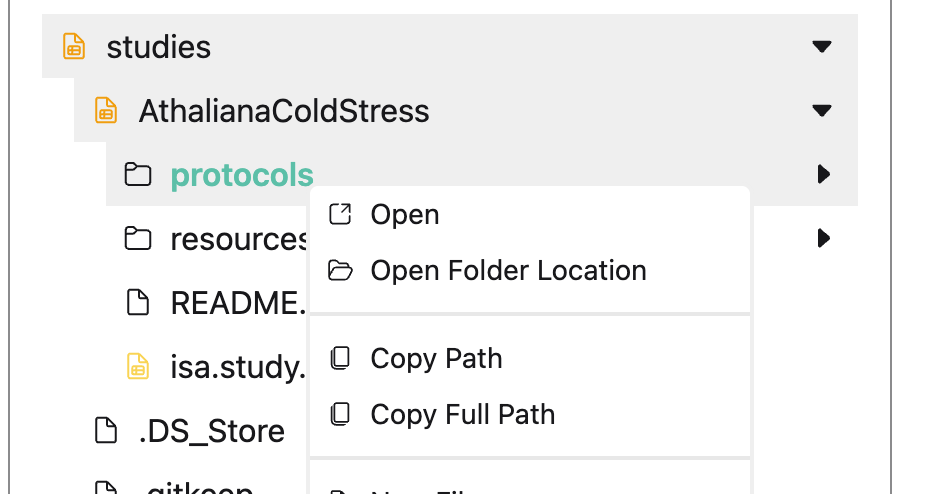
-
Move the file
growth_protocol.mdfrom the demo data into theprotocolsfolder. -
The file is added to your ARC and can be edited via ARCitect-GX
- AthalianaColdStressSugar
Directorystudies
- AthalianaColdStress
Directoryprotocols
- growth_protocol.md
- …
-
A click on the protocol’s file name opens a text editor in the right panel.
Add samples to your study
Section titled “Add samples to your study”And where do I note down the plants I used?
Structured metadata annotation in the ARC is mostly achieved via spreadsheet tables.
Let us start by adding the samples to the study.
-
Click on the study’s name (
AthalianaColdStress) in the file tree. -
At the bottom of the right panel, click on the
+ New Table right next to theStudysheet. -
Select “Create basic table”.
-
This adds a new table sheet with three columns
Input[Sample Name],Protocol UriandOutput[Sample Name]and three empty rows -
Right-click on sheet’s tab to rename it to “plant-growth”.
-
At the bottom of the table, type
3in the text field and click+ to add another three rows to the table.I called my plants: “Cold1”, “Cold2”, “Cold3” and “RT1”, “RT2”, “RT3”
And the leaf samples accordingly: “Cold1_leaf”, “Cold2_leaf”, “Cold3_leaf” and “RT1_leaf”, “RT2_leaf”, “RT3_leaf”.
-
Add the sample identifiers into the columns
Input[Sample Name]andOutput[Sample Name].Input[Sample Name]ProtocolUriOutput[Sample Name]Cold1 Cold1_leaf Cold2 Cold2_leaf Cold3 Cold3_leaf RT1 RT1_leaf RT2 RT2_leaf RT3 RT3_leaf This means that input “Cold1” results in output “Cold1_leaf”.
-
Click on the study’s name (
AthalianaColdStress) in the file tree. -
At the bottom of the right panel, a sheet “AthalianaColdStress Table” is automatically added, which contains a basic annotation table with three columns
Input[Sample Name],Protocol UriandOutput[Sample Name]and three empty rows. -
Right-click on sheet’s tab to rename it to “plant-growth”.
-
At the bottom of the table, type
3in the text field and click+ to add another three rows to the table.I called my plants: “Cold1”, “Cold2”, “Cold3” and “RT1”, “RT2”, “RT3”
And the leaf samples accordingly: “Cold1_leaf”, “Cold2_leaf”, “Cold3_leaf” and “RT1_leaf”, “RT2_leaf”, “RT3_leaf”.
-
Add the sample identifiers into the columns
Input[Sample Name]andOutput[Sample Name].Input[Sample Name]ProtocolUriOutput[Sample Name]Cold1 Cold1_leaf Cold2 Cold2_leaf Cold3 Cold3_leaf RT1 RT1_leaf RT2 RT2_leaf RT3 RT3_leaf This means that input “Cold1” results in output “Cold1_leaf”.
Referencing the protocol
Section titled “Referencing the protocol”In the next step we draw a link between the original protocol and the structured metadata. We reference the protocol in the annotation table to say:
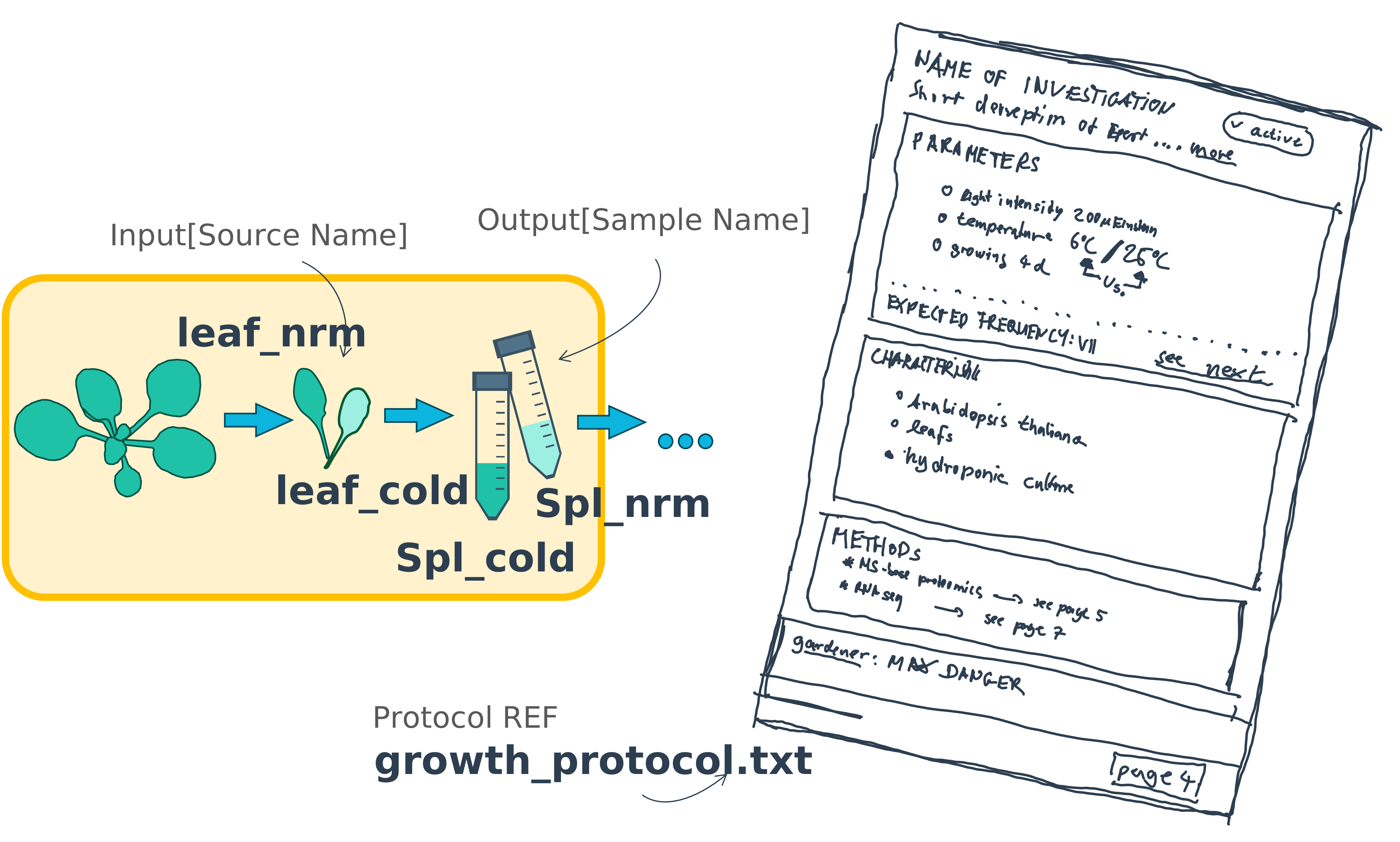
Plant “Cold1” results in sample “Cold1_leaf” by applying the protocol to it.
-
On top of the annotation table, click .
-
From the dropdown menu select
More->ProtocolUriand clickAdd Column. -
On top click to open the
File Picker. -
In the
File Pickerwidget, clickPick Files. -
From the ARC select the file
protocols/growth_protocol.mdand clickOpen. -
Select a cell in the
ProtocolUricolumn and clickInsert file names.Input[Sample Name]ProtocolUriOutput[Sample Name]Cold1 protocols/growth_protocol.md Cold1_leaf Cold2 Cold2_leaf Cold3 Cold3_leaf RT1 RT1_leaf RT2 RT2_leaf RT3 RT3_leaf -
To fill the complete column with the same value, right-click on a cell and select
Fill Column.Input[Sample Name]ProtocolUriOutput[Sample Name]Cold1 protocols/growth_protocol.md Cold1_leaf Cold2 protocols/growth_protocol.md Cold2_leaf Cold3 protocols/growth_protocol.md Cold3_leaf RT1 protocols/growth_protocol.md RT1_leaf RT2 protocols/growth_protocol.md RT2_leaf RT3 protocols/growth_protocol.md RT3_leaf
-
On top of the annotation table open the
File Picker.
-
In the
File Pickerwidget, clickPick Files. -
From the ARC select the file
protocols/growth_protocol.mdand clickOpen. -
Select a cell in the
ProtocolUricolumn and clickInsert file names.Input[Sample Name]ProtocolUriOutput[Sample Name]Cold1 protocols/growth_protocol.md Cold1_leaf Cold2 Cold2_leaf Cold3 Cold3_leaf RT1 RT1_leaf RT2 RT2_leaf RT3 RT3_leaf -
To fill the complete column with the same value, right-click on a cell and select
Fill Column.Input[Sample Name]ProtocolUriOutput[Sample Name]Cold1 protocols/growth_protocol.md Cold1_leaf Cold2 protocols/growth_protocol.md Cold2_leaf Cold3 protocols/growth_protocol.md Cold3_leaf RT1 protocols/growth_protocol.md RT1_leaf RT2 protocols/growth_protocol.md RT2_leaf RT3 protocols/growth_protocol.md RT3_leaf
But from my understanding this is not really machine readable, right?
Yes, but it still contains valuable information! As we now can link the protocol to the samples, we can later on use the protocol to extract more information from the samples.
From free-text protocol to structured metadata
Section titled “From free-text protocol to structured metadata”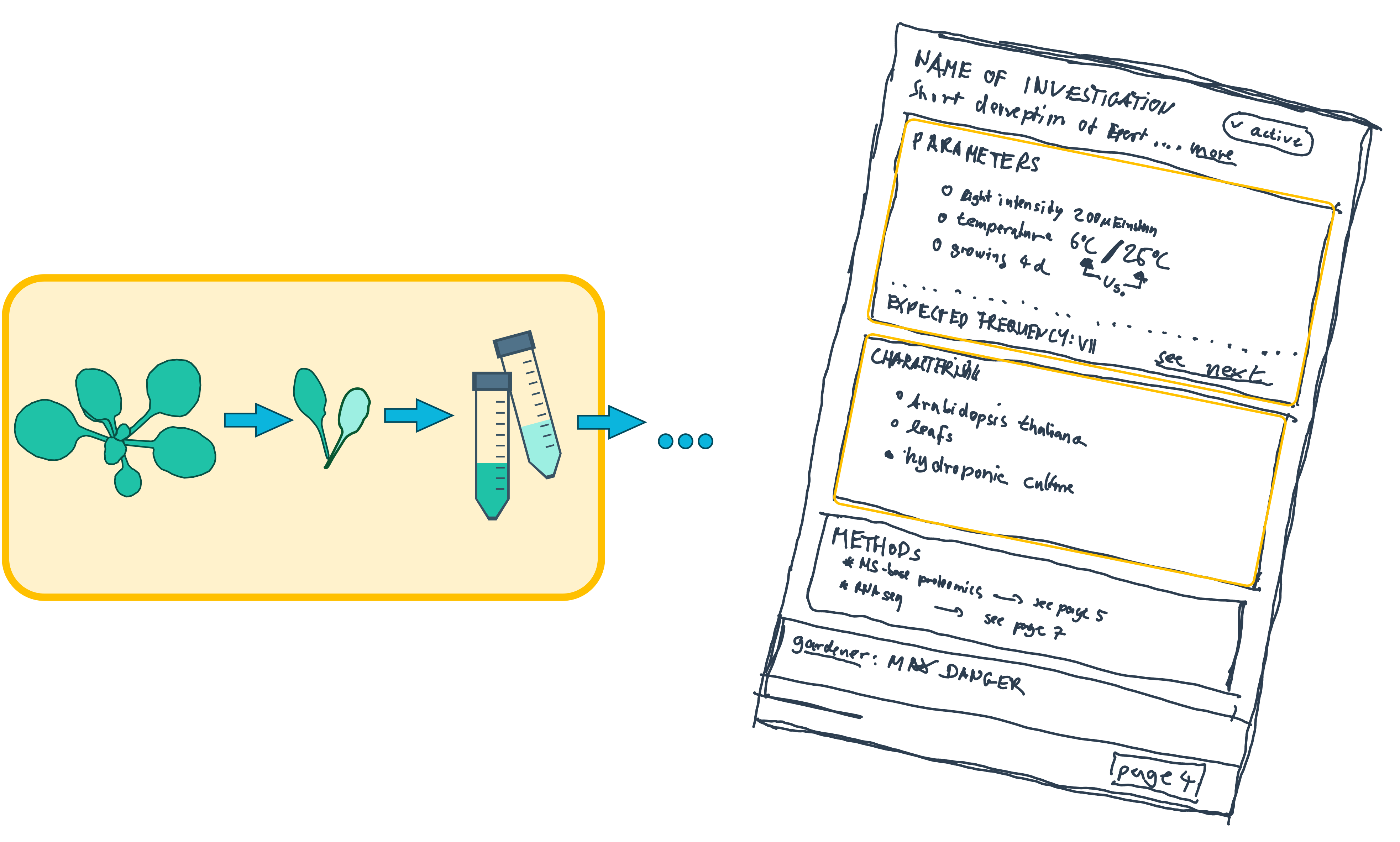
Finding the metadata vocabulary and descriptors
Section titled “Finding the metadata vocabulary and descriptors”The ARC builds on standards and leverages ontologies for metadata annotation. The details are out of the scope of this guide. However, it is good to know that a combination of structural and biological ontologies are combined to semantically structure the metadata.

So I need to find the important information in my protocol and then add it to the metadata table?
Yes! Imagine ontologies like a vocabulary. You can use them to describe your samples in a standardized way. This makes it easier for others to understand your data.
Parameterizing the study
Section titled “Parameterizing the study”Let us look at the growth protocol and extract the important information.
# Study Name: Growth Protocol for *Arabidopsis thaliana*
## Parameters:- 200 µmol photons m²/s (200 Einstein)- Alternating 6°C (cold treatment) and 25°C (control)- 4 days
## Characteristics:- *Arabidopsis thaliana*- Leaf- Hydroponic culture- Columbia (Col-0)
...Then we need to put this information into context:
“Arabidopsis thaliana” is a “Characteristic” of the samples, describing its “Organism”.
Characteristics [ ]
Section titled “Characteristics [ ]”-
Organism Arabidopsis thaliana
-
Tissue Leaf
-
Growth medium Hydroponic culture
-
Ecotype Columbia
Parameters [ ]
Section titled “Parameters [ ]”-
Exposure duration 4d
-
Light intensity 200 µEinstein
-
Temperature 6°C / 25°C
Add characteristics
Section titled “Add characteristics”-
On top of the annotation table, open the
Add Building Blockwidget . -
From the dropdown menu select
Characteristic. The order of blocks shown below may not correspond to what you see in ARCitect but we will learn how to rearrange columns later. -
Enter
organismin the search bar. This search looks for suitable terms in the ontology database. -
Select the Term with the id
OBI:0100026and clickAdd Column. -
In the table, insert values by selecting any cell below
Characteristic [organism].I worked on Arabidopsis thaliana plants
-
Search for Arabidopsis thaliana, select a suitable hit and again fill the complete column with right-click on a cell and select
Fill Column.Input[Source Name]Characteristic [organism]Output[Sample Name]Cold1 Arabidopsis thaliana Cold1_leaf Cold2 Cold2_leaf Cold3 Cold3_leaf RT1 RT1_leaf RT2 RT2_leaf RT3 RT3_leaf Great, I’ve got this! Now I can add building blocks for the characteristics “tissue” and “growth medium” and enter the values “leaf” and “hydroponic plant culture media”, respectively.
Add a parameter with a unit
Section titled “Add a parameter with a unit”Parameters works just like Characteristics, right? But they also contain numbers with a unit, how can i add that?
Yes, you are right! Parameters are similar to Characteristics. To use units you can simply select the Unit toggle during the Add building block step and then insert the value in the table afterwards.
-
In the Building Blocks widget , select Parameter, search for
exposure duration. -
Click
Unitand search fordayin the adjacent search bar. Select the term with the id “UO:0000033” from the unit ontology (UO). -
Click
Add Column. -
In the annotation table, select any cell below
Parameter [exposure duration]and add “4”. -
Repeat the steps for the parameter
Light intensity.
Add a factor building block
Section titled “Add a factor building block”So what do i do with “temperature”? My experiment revolves around this specific parameter.
In this case, you can use a Factor building block. Factors are used to describe the experimental conditions that are manipulated in an experiment.
-
In the Building Blocks widget , select Factor, search for
temperature day, select the term with the IDDPBO:0000007. -
Check the box for Unit and search for
degree celsiusin the adjacent search bar. -
Select
UO:0000027. -
Click
Add Column. -
In the annotation table, add “25” vs. “6” degree celsius to the respective samples.
Input[Source Name]Characteristic [organism]Factor [temperature day]Output[Sample Name]Cold1 Arabidopsis thaliana 6 degree celsius Cold1_leaf Cold2 Arabidopsis thaliana 6 degree celsius Cold2_leaf Cold3 Arabidopsis thaliana 6 degree celsius Cold3_leaf RT1 Arabidopsis thaliana 25 degree celsius RT1_leaf RT2 Arabidopsis thaliana 25 degree celsius RT2_leaf RT3 Arabidopsis thaliana 25 degree celsius RT3_leaf
Show ontology information
Section titled “Show ontology information”You can press F2 after selecting a table cell or open the context menu with right click and open Details to view all ontology information stored for this cell. By default, only the term name is shown in the table with an green checkmark indicating that a full ontology term exists.
Term
Arabidopsis thaliana
NCBITaxon
NCBITaxon:3702
So if someone needs to look up my species, they will find it in an online ontology database.
Re-organize the annotation table
Section titled “Re-organize the annotation table”If the order of the building blocks needs to be adjusted, you can delete or move them from your annotation table.
Right-click a column and select
Delete Columnto remove itMove Columnto move a column to another position