
ARC Publications
Introduction
Section titled “Introduction”Data is usually the primary output of scientific research; in contrast, the universal measurement of research success is the publication. In the past, accessing the underlying data of a published research paper oftentimes required the tedious process of contacting the original authors and asking for access. ARCs are FAIR Digital Objects (FDOs). One of DataPLANT’s main goal is facilitating the publication of ARCs as data publications.
ARC publication tools and services
Section titled “ARC publication tools and services”The ARC data publication process is enabled by a set of tools and services that are integrated into DataPLANT’s DataHUB and are employed by different persons along the following steps:
- Creating and uploading the ARC
- Tool/Service: ARCitect or ARC Commander and DataHUB
- Person: ARC author
- Metadata validation
- Tool/Service: Continuous Quality Control (CQC) in the DataHUB
- Person: ARC author
- Request for Publication (RFP)
- Tool/Service: ARChigator
- Person: ARC author
- Revision and curation
- Tool/Service: DataHUB and ARChigator
- Person:
- Revision: ARC reviewer
- Curation: ARC author/data steward
- (Submission for) publication
- Tool/Service: ARChive
- Person: ARC reviewer
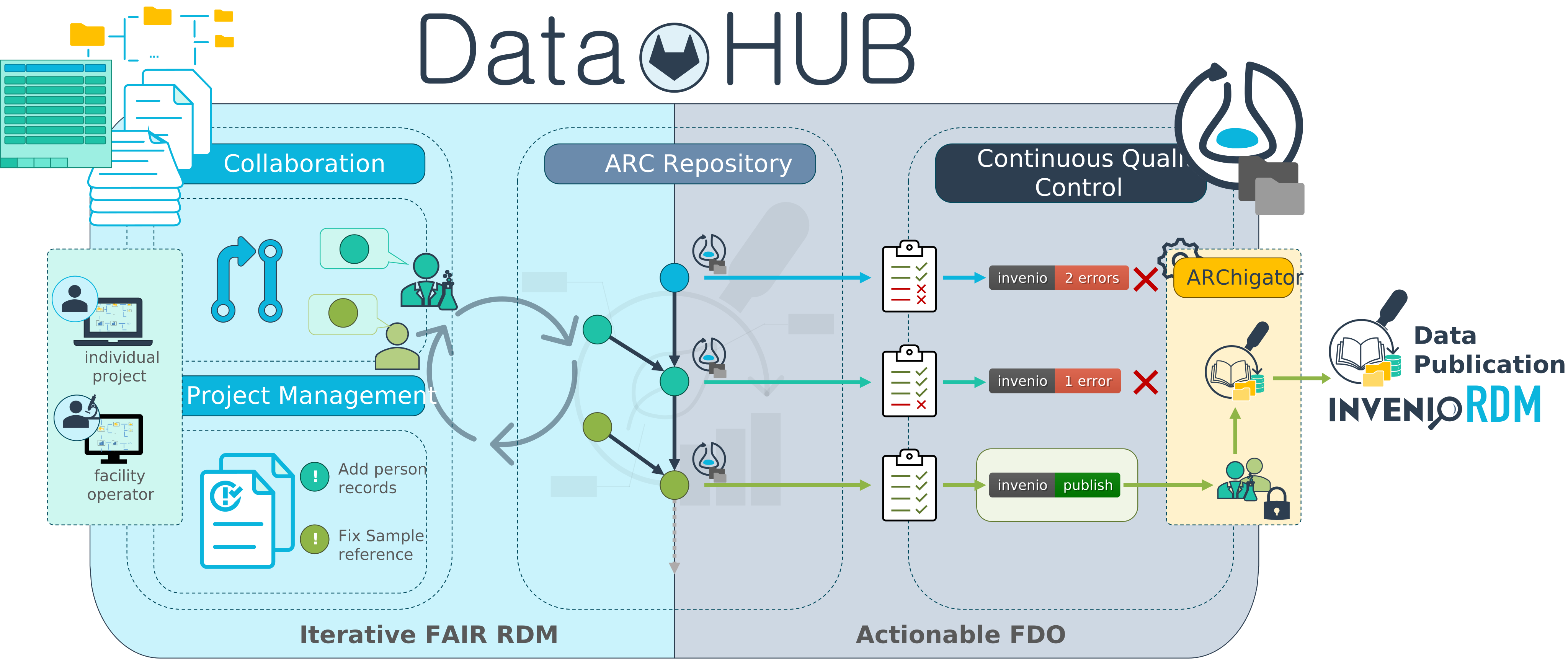
Tools to iteratively create ARCs (ARCitect, ARC Commander, Swate) as well as the DataHUB are described in detail in the Tools and Services section. Here we want to introduce the three tools that are specifically used for the ARC publication process: Continuous Quality Control (CQC), ARChigator, and ARChive.
Continuous Quality Control (CQC)
Section titled “Continuous Quality Control (CQC)”Continuous Quality Control (CQC) is a process that ensures the quality of the metadata of an ARC meets certain standards. In short the validation and CQC pipeline is performed on each commit to an ARC, and the results of each step are displayed on the ARC homepage. Upon every commit to an ARC repository, the DataHUB can perform automated quality control measures based on the committed changes.
An ARC can be validated in the DataHUB against a selection of validation packages. For instance, one can validate an ARC
- against the
arc_specification– to make sure that the ARC is intact - against the
inveniorequirements – InvenioRDM is the basis of DataPLANT’s publication service ARChive
ARChigator: the ARC submission interface
Section titled “ARChigator: the ARC submission interface”The ARChigator is an interface for submitting ARCs hosted on DataHUB for publication in the ARChive. Only those ARCs that pass the invenio CQC are eligible for submission.
The ARChigator dashboard acts as a last-stop preview of the ARC record metadata and data. When submitting an ARC, ARChigator will display the metadata record that will be used for the ARC publication. This allows for a last manual check if the metadata is correct and complete before submitting the ARC for publication or cancelling the submission if something is missing or incorrect.
Once submitted via ARChigator, ARCs are submitted as a request for publication (RFP). An email sent to the addresses registered in the ARCs metadata contains a link to the ARCs publication status page, which allows the ARC authors to track the progress of the publication process and to interact with the ARC reviewer.
The ARC is then reviewed by DataPLANT’s reviewer board. The ARC reviewer might request changes to metadata entries to meet certain quality criteria. These requirements are communicated via the DataHUB’s issue system directly on the ARC. This allows for a transparent discussion and iterative curation between the ARC authors, Data Stewards and ARC reviewers.
ARChive: The collection of published ARCs
Section titled “ARChive: The collection of published ARCs”After ARC revision and RFP acceptance, the ARC is published and registered with a Digital Object Identifier (DOI) via the ARChive. The ARChive platform builds on InvenioRDM, an open source publication platform developed by CERN.
In the ARChive, ARCs can be assigned to a selected community.
In addition to citing ARCs in journal publications, the ARChive allows to download the files and folders contained in the ARC.