
PLANTDataHUB
-
Click on Manage in the left navigation panel.
-
Click on Members.
-
Click on Invite members.
-
Search for potential collaborators.
-
Select a role.

Now my local and remote ARCs are synchronized. But how can I invite my project partner?
PLANTDataHUB
Click on Manage in the left navigation panel.
Click on Members.
Click on Invite members.
Search for potential collaborators.
Select a role.
When inviting new members to an ARC or group, you can choose between different roles.
Guest – Has the least rights. They will not be able to see the content of an ARC (only the wiki page).
Reporter – Has read access to your ARC. This is recommended for people you ask for consultancy.
Developer – The choice for most people you want to invite to your ARC. Developers have read and write access, but cannot maintain the project on the DataHUB, e.g. invite new members.
Maintainer – Has read and write access and can add or remove members, except for yourself. This is the minimum role recommended for inviting group leaders as it allows them to add their group members for data upload or analysis to the project.
Owner – An owner has basically all rights to the ARC. They can delete or transfer the ARC and manage user memberships.
I will invite my PI Prof. Jasmine Beetroot as Maintainer and my collaboration partner Oliver Sage as Developer.
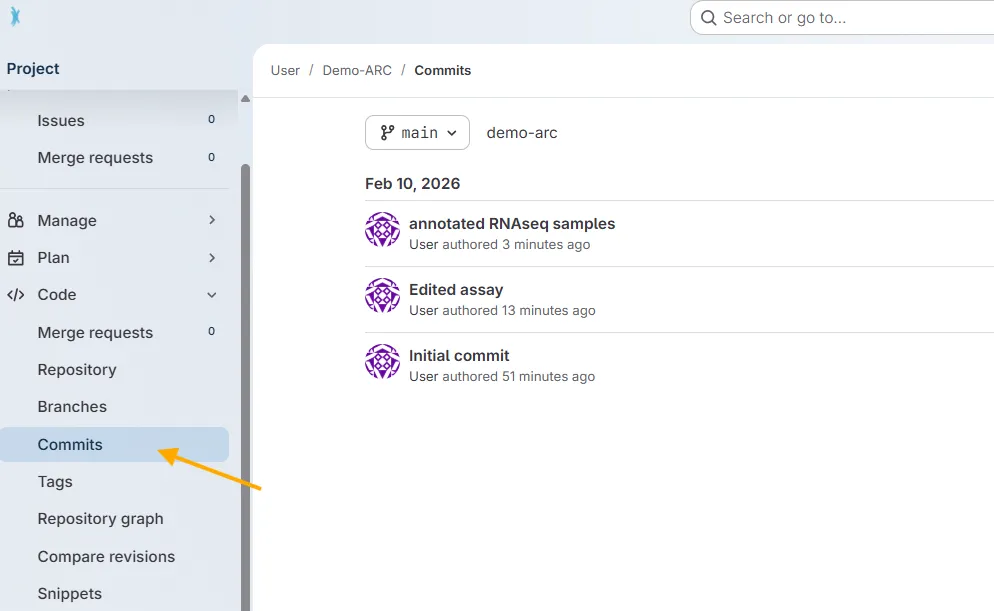
All commit messages added to your ARC via ARCitect or ARC Commander are available in the DataHUB.
Open your ARC in the DataHUB
In the sidebar on the left, navigate to Code → Commits.
There you find a chronological list of syncing messages together with who synced (if you collaborate with others on an ARC) and when.
The DataHUB can also be used for Project Management. With issues you can collaborate on ideas and plan your work.
PLANTDataHUB
Click on Plan in the left navigation panel.
Click on Issues.
Create a new Issue.
It would be good to have summary statistics for sugar measurement from my project collaborator.
Type in a Title Summary statistics for sugar measurement.
Fill out the Description.
Assign yourselve or collaboration partner to the task.
Click Create Issue.