elab2ARC
- Open the website elab2ARC and go to the Token tab
- Select the eLabFTW instance: DataPLANT
- Click
Get a test API keyto optain an eLabFTW API Key - Click
Get a tokento automatically generate a token for your DataHUB account. - Click
Save.

I documented some of my protocols and data in the electronic lab notebook eLabFTW! Can I somehow convert this entries into a format that can be used in the ARC?
Yes, you can! We developed a browser-based tool bridging eLabFTW with ARCs. We will use pre-created entries as examples.
elab2ARC
Get a test API key to optain an eLabFTW API KeyGet a token to automatically generate a token for your DataHUB account.Save.You have now authenticated your account and can use the tool to convert your eLabFTW data directly into the ARC.
I have several eLabFTW entries, some belong to the study part, others to assays. How can I handle that?
The tool allows you to choose which part of the ARC you entries should belong to. We will first create an example for the study part.
elab2ARC
Preview button of entry 66: Arabidopsis growth protocol to view its content. Close the preview afterwards.Confirm eLabFTW Selection.Select study to define the target folder. This will update the Target Path shown at the bottom.Start Conversion to begin the conversion. The converted data will be uploaded directly to the ARC.View ARC and the ARC is opened in the DataHUB.Now a new study folder containing the content of the eLabFTW entry is now created in the ARC. The structure ARC including the converted data looks like this:
elab2ARC
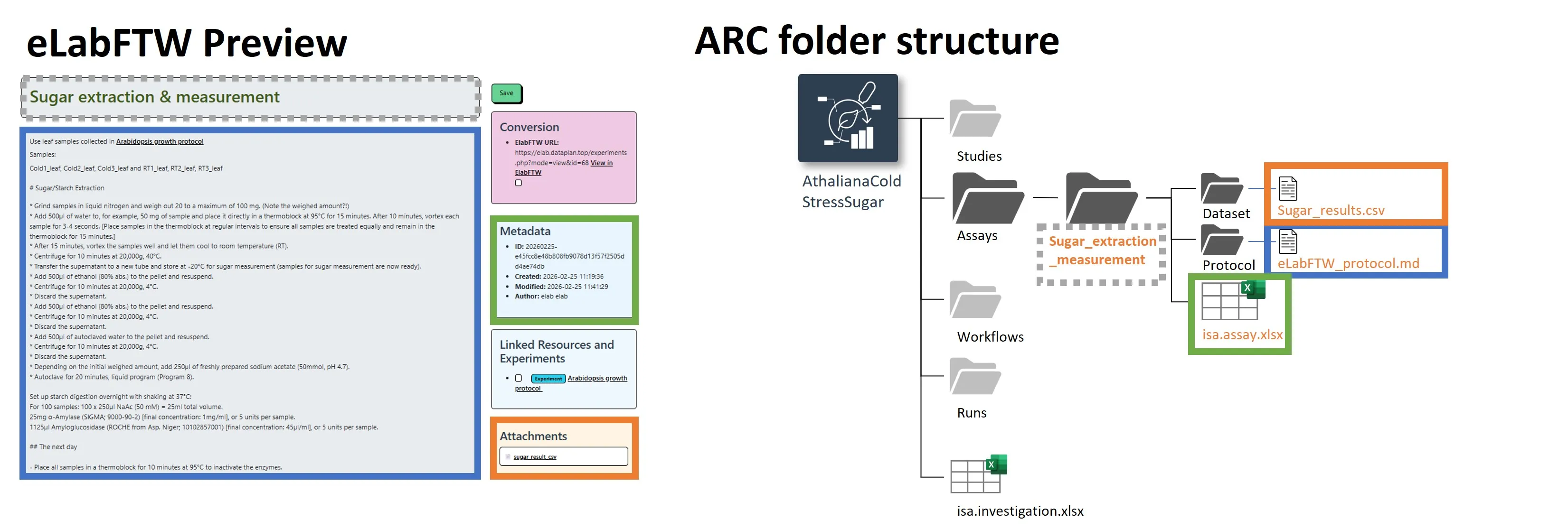
Preview button of entry 68: Sugar extraction & measurement to view its content. This entry also includes the attachment sugar.results.csv. Close the preview afterwards.Confirm eLabFTW Selection.Select assay to define the target folder.Start Conversion to begin the conversion. The converted data will be uploaded directly to the ARC.View ARC to directly check it in the DataHUB.A new asssay folder containing the content of the eLabFTW entry is now creating in the ARC. Because the eLabFTW entry includes a file attachment, it is also added to the assay’s dataset folder. The metadata extracted by the LLM is added to the isa.assay sheet, which we later check in ARCitect.
Thats great! I can easily convert my eLabFTW entries into the ARC and have all the data and metadata together. This will save me a lot of time in the future!
To get a better understanding of the conversion process, take a look at the image below. The tool uses the eLabFTW title as the name of the created study or assay folder in the ARC. The main text of the eLabFTW entry is converted into a Markdown file and added to the protocols folder. All attachements of the eLabFTW entry are added to the dataset folder. Low-level administrative metadata (e.g. creation date, author, etc.) are added to the isa.study or isa.assay sheet. If you enable the LLM Annotation Table, the tool will also extract experimental metadata from the main text of the eLabFTW entry and add it to the corresponding isa.study or isa.assay sheet.